Truxton Extreme Model Viewer — Study What You Destroyed
Catalogue Geranium war engines between credits and turn scrap into pattern memory.
Why Model Viewer exists
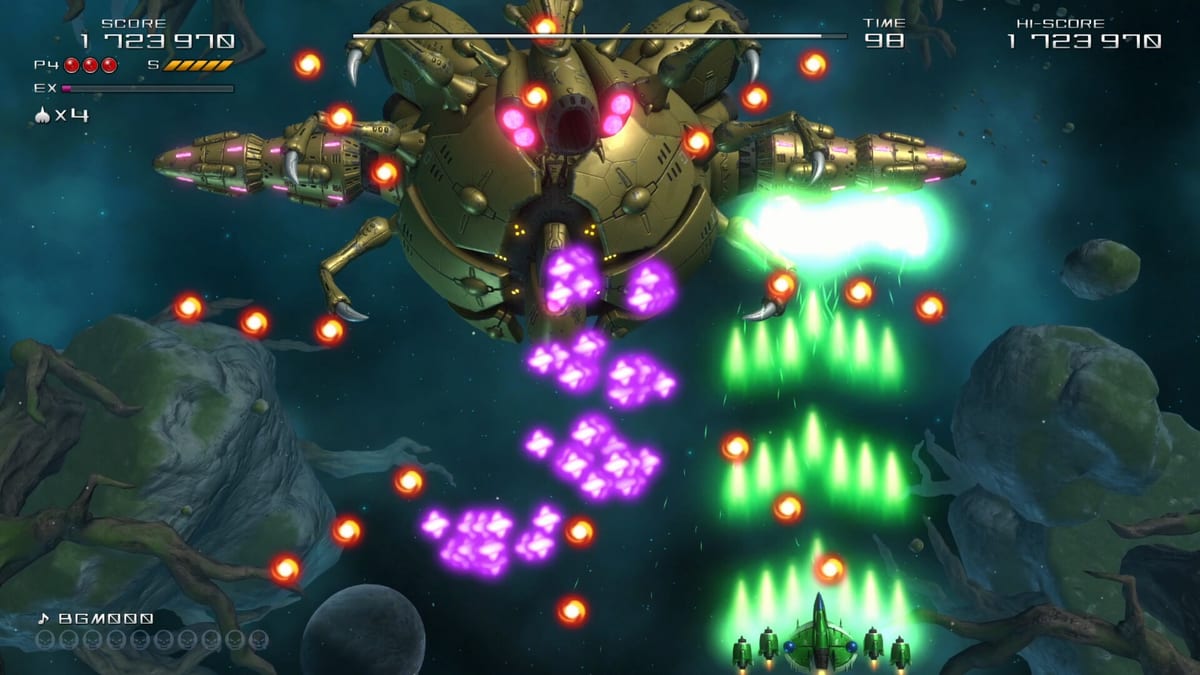
Truxton Extreme is a vertical shmup, but Clear River Games and Tatsujin still ship a quiet study tool for players who want more than another blind credit. The Model Viewer catalogues enemies you have defeated so you can inspect silhouettes, mechanical details, and attack-family shapes without dying mid-stage. It sits beside Pipiruville and Training as post-sortie content: not required for a clear, extremely useful for a consistent one.
Official store pages pitch Model Viewer as part of the “master of unlocking” fantasy. Defeat something once, unlock its entry, then revisit when a later stage reuses the same chassis with denser bullets. That loop rewards curiosity instead of forcing you to pause a live run and guess hitboxes under pressure.
How entries unlock
Model Viewer entries unlock when you destroy the corresponding enemy or boss part during any combat mode that feeds the main roster — Story, Arcade, Heart Starter, Team, and usually Arena as well. Tutorial-only props may not catalogue fully; treat Story stage clears as the reliable unlock path.
You do not need a perfect no-death run. Partial stage clears still register enemies you finished before a continue. If an entry stays blank after several credits, you likely skipped that spawn route — switch weapon coverage with the weapon picker or farm the section in Training once that mode unlocks.
What to study first
Prioritize mid-boss and stage-boss frames. Truxton Extreme sells gigantic mechanical horror: insectoid faces, tentacle rails, serpentine segments, glowing sensor clusters. Model Viewer lets you rotate those silhouettes calmly so you recognize which appendage telegraphs a sweep before the bullet curtain arrives.
Next, catalogue popcorn families that seed screen clutter. Homing and Power Shot users often ignore them; Beam and Thunder Laser players need to know which small craft leave dense trails. Pair visual study with the boss guide for survival habits without inventing unofficial boss names.
Model Viewer versus Training Mode
Training Mode lets you rehearse live patterns at adjustable pace. Model Viewer does not replace that — it prepares your eyes. A practical workflow:
- Fail a Story stage on an unfamiliar mid-boss.
- Open Model Viewer and inspect the newly unlocked frame.
- Jump into Training (once unlocked near the early score gate) and loop the section.
- Return to Story or Arcade with a planned bomb budget.
Players who skip Model Viewer often misjudge vertical hitboxes on 3D meshes that look larger than their damageable cores. The viewer exists to correct that optical illusion.
Co-op and shared catalogues
In Team Mode, either player can unlock entries for the shared save when an enemy dies. Communicate who is farming unfamiliar sections so both partners see the same Model Viewer library before a serious duo credit. Frame redirection tactics mentioned in the co-op guide become safer once both pilots recognize which emitters track nearest-ship targeting.
Collection goals and completionists
Model Viewer is not a score multiplier, but it is a completion meter for players who also develop Pipiruville. Clearing Story routes across Ash, Bergamot, and Cyrilla naturally fills most of the bestiary because stage layouts largely overlap while enemy density climbs. Arcade loops and Arena spam fill rare popcorn variants that Story skips on softer difficulties.
If you bought Thunder Master Edition for the art book, treat Model Viewer as the interactive companion: Inoue’s manga shows character emotion; the viewer shows Geranium engineering. Cross-check editions if you want physical art references beside the in-game catalogue.
Platform notes
Model Viewer is available on PS5, Xbox Series, Nintendo Switch 2, Steam, and GOG builds that ship the full unlock suite. Input is menu-driven — keyboard and gamepad both work. See platforms for storefront differences that do not change Model Viewer mechanics.
Common mistakes
- Opening Model Viewer mid-credit panic instead of after a clean fail — you learn less when stressed.
- Studying only final bosses and ignoring mid-stage turrets that actually end runs.
- Assuming Heart Starter skips catalogue progress — it still unlocks entries while teaching patterns.
- Never linking visual study back to weapon roles — a lock-on laser looks different when you know which appendage is the true weak node.
Suggested reading path
After filling a few Model Viewer pages, revisit How to Play for EX and bomb timing, then scoring if you plan Arena. Unlock tracking lives on the unlock checklist. Story fans should also read the digital comic guide so narrative panels and enemy catalogues reinforce each other instead of competing for attention.
Model Viewer will not clear a stage for you. It will shorten the number of credits you waste rediscovering the same silhouette under fire — exactly the kind of quiet tool a modern Tatsujin revival should ship.
Frequently Asked Questions
Quick answers to the most common questions.
How do I unlock Model Viewer entries?
Defeat the enemy or boss part in Story, Arcade, Heart Starter, Team, or Arena. Entries appear after the sortie registers the kill on your save.
Is Model Viewer required to finish Story?
No. It is an optional study catalogue. Use it when a pattern feels unfair because the 3D mesh hides the real hitbox.
Does Heart Starter still unlock models?
Yes. Forgiving recovery does not block bestiary progress — Heart Starter is a strong way to fill the catalogue safely.
Should I use Model Viewer or Training first?
Inspect the model, then rehearse in Training. Viewer builds recognition; Training builds muscle memory.
Do co-op kills unlock entries?
Team Mode kills count for the shared save, so either partner can expand the Model Viewer library.