How to Play Truxton Extreme
Core mechanics, modes, and a smart first-session checklist.
What kind of game is this?
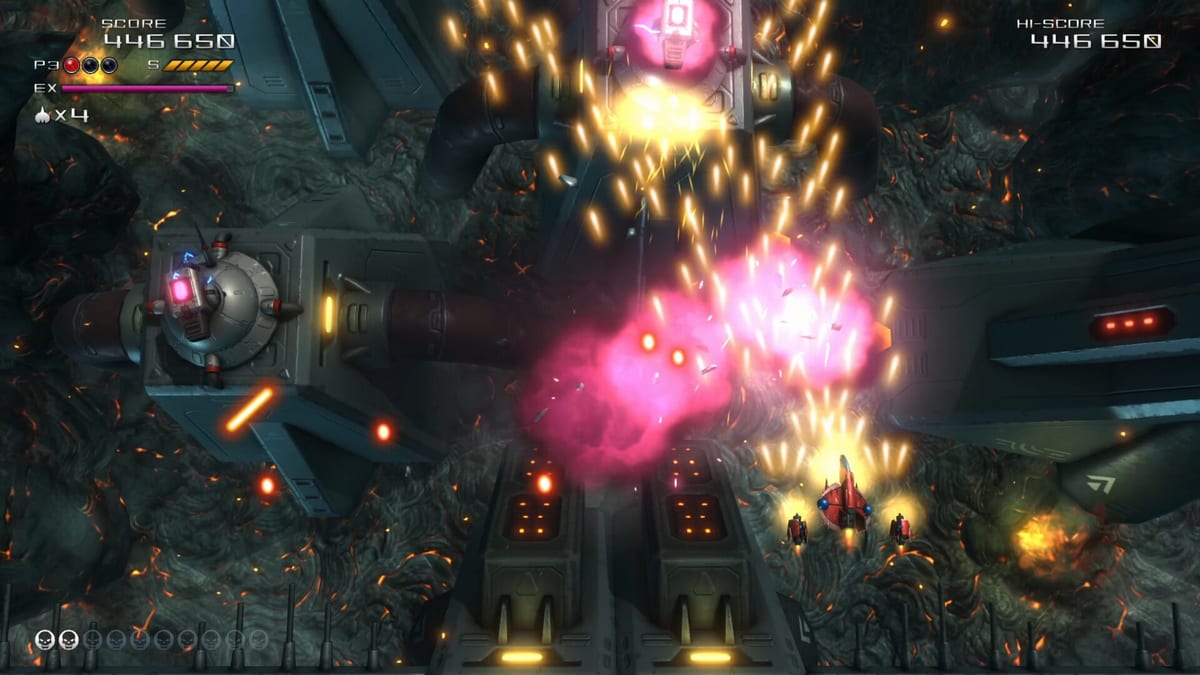
Truxton Extreme is a vertical scrolling shoot ‘em up developed by Tatsujin and published by Clear River Games. You pilot a Javelion fighter against the machine-lifeform Geranium across colony worlds rendered in fully 3D art that keeps the classic Toaplan silhouette readable. The pace sits closer to memorization-heavy classics like R-Type than modern bullet-hell endurance tests, which matters when you plan routes and weapon pickups.
If you only remember one idea: survive, collect color-coded weapons, build EX meter by destroying enemies, and save bombs for panic moments or score setups. Everything else in this guide expands those four verbs.
First launch checklist
When you boot the game, visit Options before Story. Confirm movement speed, autofire if available on your platform, and whether you want manual speed boost on a hold or toggle. Truxton Extreme lets you raise starting lives and bombs for comfort, but doing so typically disables ranked score submission — a fair trade for learning patterns.
From the main menu you will see Story, Arcade, Heart Starter, Team, Arena, Training, Tutorial, and extras such as Model Viewer and Pipiru Village. Heart Starter and Tutorial are the safest onboarding ramps. Story is the narrative spine. Arcade is the purist ladder. Our mode unlock guide explains which entries appear immediately versus which require progress.
Movement, speed, and autofire
Your ship moves in eight directions across the lower portion of the screen. Unlike many bullet-hell titles that lock you to a single speed tier, Truxton Extreme supports on-the-fly speed adjustment via a dedicated speed control — exact binding varies by platform, so verify under Options or read our keyboard and gamepad pages.
Collecting speed icons raises your maximum velocity cap, while the manual boost lets you dart through gaps or slow down for precision grazing. Autofire, when enabled, removes the need to hold the shot button during long streams. Use Heart Starter to feel the difference between slow tap movement and boosted weaving without losing a life every mistake.
Weapons and power levels
Weapon type is determined by colored pickups left on the playfield. Reviews and official materials reference Power Shot, Truxton Beam, Thunder Laser, Homing Shot, Star-mine Shot, and additional variants. Each color behaves differently: spread patterns, piercing beams, homing streams, and wide coverage shots.
Collect three power icons of the active type to increase that weapon’s level, usually up to level three. Upgrades widen spreads, add lock-on behavior, or increase damage density. Because pickups drift, plan your horizontal position so the icon you want crosses your ship path without forcing you through enemy bullets.
Switching colors resets the level ladder for the new type. Sometimes staying on a leveled beam is better than grabbing a fresh spread shot at level one. Mid-stage weapon discipline separates clean clears from accidental deaths.
Bombs and the EX gauge
Bombs clear bullets and deal heavy damage, often accompanied by the series’ iconic skull motif. They are limited, though you can adjust starting counts in options at the cost of ranking eligibility.
The EX gauge fills as you destroy enemies — tougher targets generally contribute more meter. Spending EX temporarily supercharges your current weapon with denser, faster output. Creative Bloq and Nintendo Life both highlight EX as a satisfying risk-reward layer: you hit harder, but many players report slower movement while EX is active, so do not activate it while hugging a bullet wall.
Enemies destroyed during EX can drop bonus score items, tying EX usage directly into scoring strategy.
Story mode flow
Story combines stage clears with animated manga episodes illustrated by Junya Inoue. You follow three TATSUJIN pilots across eighteen chapters. Episodes unlock as you progress; you can replay unlocked chapters from the Story menu without repeating the entire campaign linearly.
Between stages, comic panels advance the plot about AI President Rose, cyborg volunteers, and humanity’s seven-colony collapse. Voice acting is not a focus — text and visuals carry the narrative. For character motivations, see characters and the walkthrough outline.
Heart Starter and Arcade
Heart Starter is the beginner-friendly mode highlighted in multiple reviews. When you get hit, you recover after a brief invulnerability window instead of losing a life immediately. It is ideal for learning enemy spawn timing and boss openings. Note that some reviewers mention Heart Starter may restrict how much of the campaign you can sample in one sitting — treat it as training wheels, not the full marathon.
Arcade removes story interludes and expects a traditional sequential clear. Checkpoints are sparse compared with Story, which is why critics sometimes critique harsh restarts. Unlock Arcade by playing the first Story mission; details live in how to unlock modes.
Arena, Training, and extras
Arena runs two-minute score attacks — the mode several reviewers kept returning to on Switch 2. Training and Tutorial teach mechanics in isolation. Model Viewer and Pipiru Village reward repeated play with cosmetic and collection goals. Permanent ship XP upgrades grow your Javelion between credits, while the Interactive Digital Comic carries Story narrative. Franchise context lives in series history; storefront choice is covered under platforms.
Multiplayer and rankings
Local co-op uses Team mode with shared lives, shared bombs, and combined score. Networked multiplayer is not the focus. Leaderboards exist for score chasers willing to accept default life and bomb limits.
Practical tips for session one
Play Tutorial, then one Heart Starter stage, then Story mission one. Pick one weapon color and learn its level-one and level-three behavior before chasing every pickup. Save your first bomb for the stage-end encounter — see boss guidance for pattern-reading advice without spoiler names.
When you feel comfortable, attempt Arcade and glance at scoring before Arena so you understand EX item chains. If purchase decisions remain open, read the review hub for an honest buyer summary.
Frequently Asked Questions
Quick answers to the most common questions.
What is the easiest mode for beginners?
Heart Starter and the in-game Tutorial are designed for newcomers. Heart Starter lets you recover from hits without immediately losing lives.
How do I upgrade weapons?
Collect three power icons while using the same weapon color. Pickups drift horizontally, so position your ship to catch the color you want.
What does the EX gauge do?
Destroy enemies to fill EX, then spend it for a temporary supercharged shot. Kills during EX can drop bonus score items.
Can I increase lives for learning?
Yes, through options, but higher starting lives and bombs usually disable ranked score submission.